🎵 Songloft Quick Start Guide
简体中文 • English




🎵 A self-hosted music server for personal use — manage only the music you legally own
📣 About the rename: As of v2.0, this project has been renamed from MiMusic to Songloft (the core and features remain unchanged — this is only a brand upgrade). The old
mimusic-orgGitHub organization and thehanxi/mimusicDocker image will be kept as redirects for at least one year but will no longer be updated. See the GitHub Releases for details.
🏠 GitHub • 📥 Latest stable • Download dev • 📖 Docs • 💬 Issues • 👥 WeChat Group • 💬 Telegram Group • 📣 Telegram Channel • 📸 Screenshots
💚 A labor of love · Beware of scams
Songloft is a fully free open-source project, built purely out of passion — with no commercial interest whatsoever:
- ✅ Free forever —— no paid features, in-app purchases, or subscriptions
- ✅ No ads —— no advertising or commercial promotion of any kind
- ✅ No sponsorship / donations —— there is no payment channel at all
- ⚠️ Beware of scams —— the only official channels are the GitHub repository, the docs site, the official WeChat group, the Telegram group, and the Telegram channel. Anyone charging fees, selling "paid versions", offering paid deployment, or soliciting donations in Songloft's name is unrelated to this project; we never charge anyone, not even inside the group. Please stay alert to scams.
✨ Core Features
- 🎵 Local music management — Scans local directories and automatically extracts covers and metadata from MP3/FLAC/WAV/APE/OGG/Opus/M4A/M4B/WMA/AIF/AIFF/MKA/DSF (DSD)/AAC (ADTS)/DFF/WavPack and other formats
- 🎬 Video support — Scans video containers such as MP4/MOV/M4V/MKV/WebM/AVI/TS/MPG/MPEG/FLV/WMV/RM/RMVB/3GP, detects real video tracks, and renders the picture in-app
- 🧩 JS plugin system — Runs on a QuickJS sandbox with a permission model, health checks, and hot reload; freely extend audio sources / metadata / device control and more
- 📱 Cross-platform clients — Flutter covers mobile, desktop, and Web. Lynx covers Android, iOS, Windows, macOS, HarmonyOS, and Web
- 📦 Bundle local mode — The client embeds the Go backend, so no server deployment is needed — play your local music directly on your phone or computer
- 📺 Kodi plugin client — Supports big-screen devices like Xbox, Apple TV, Raspberry Pi, and Android TV, optimized for remote control operation for a smooth living-room media experience
- 🌐 Web interface — The full edition embeds Lynx Web with root and subpath deployment support out of the box
- 🗂️ Playlist organization and resume — Shared custom tags for songs and playlists; normal playlists remember the track, millisecond position and playback mode, with audiobook resume
- 🔑 Authentication and device access — JWT dual-token login with multi-device management; individually revocable permanent access tokens for integrations
- 📡 Remote tracks and radio — Cache remote tracks and play radio in HLS, HTTP-FLV, or audio-only mode. Change playback mode for several stations at once
- 🎚️ Library filters and ratings — Query multiple track types together, such as local and remote. The server supports track ratings, bulk updates, and filtering
- 🔌 Full REST API — Built-in Swagger documentation for easy integration and further development
- ⚡ Lightweight and efficient — Written in Go, CGO-free, with no external dependencies — ideal for low-power devices like NAS and Raspberry Pi
🖼️ Screenshots
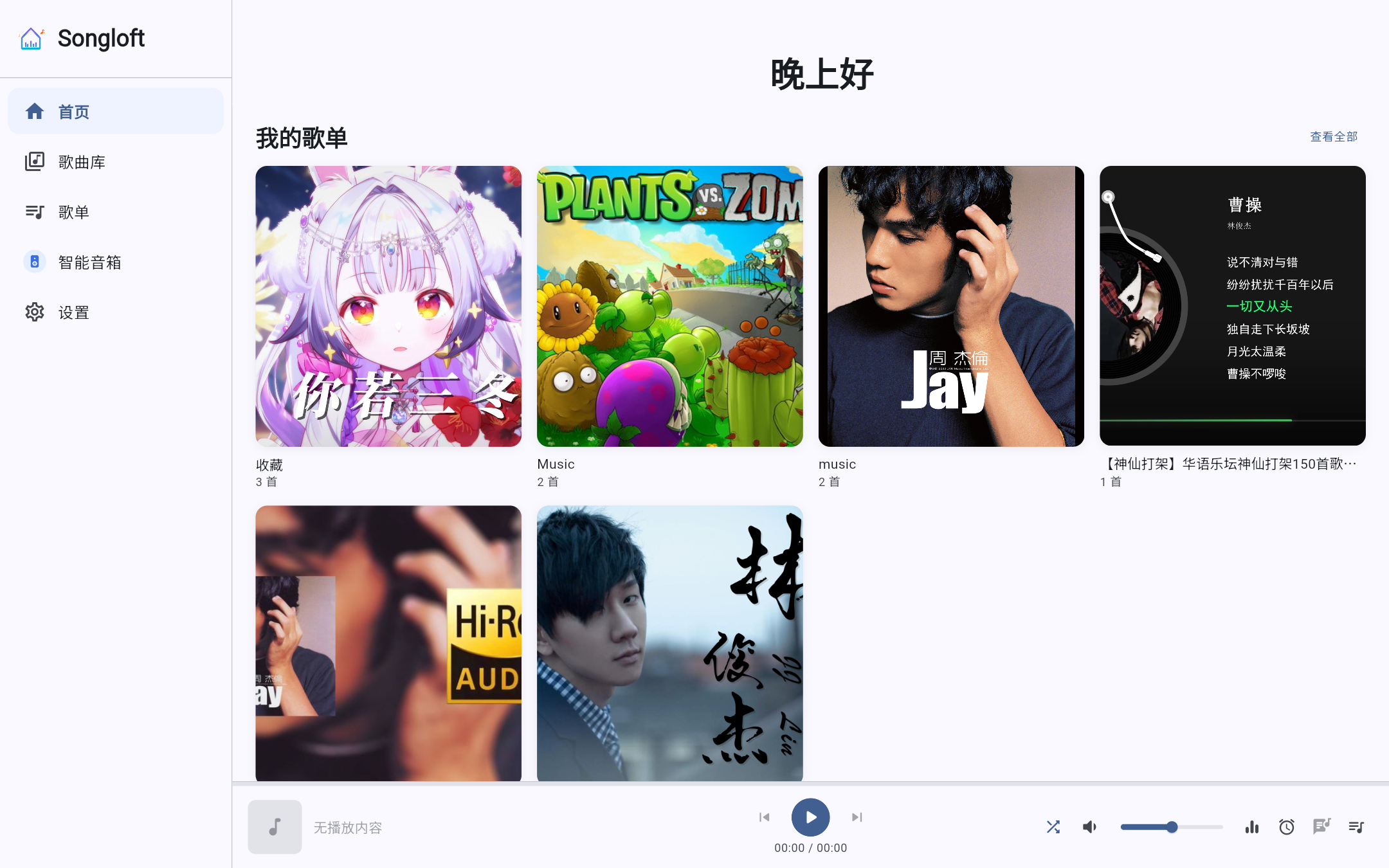

📸 More screens (library, playlists, settings, etc. — desktop / mobile with light / dark themes) are in the Screenshot Gallery.
⚖️ Copyright and Disclaimer
Songloft is a self-hosted tool for personal use, designed to help users manage the music files they legally own. Before using this project, please be sure to read and understand the following terms:
- 🚫 No music content provided — Songloft itself does not bundle, distribute, or store any copyrighted music resources. It is merely open-source software for managing your local music library
- ✅ Manage only music from legitimate sources — Users should use Songloft only to manage music files they have legally obtained, including but not limited to:
- Digital music purchased and downloaded by yourself
- Personal backups ripped from physical records
- Works you created or recorded yourself
- Public Domain works
- Works explicitly licensed under open licenses such as CC (Creative Commons)
- 🔌 Third-party plugin disclaimer — JS plugins are maintained by the third-party community. The main repository does not bundle or distribute any finished third-party audio-source plugins. The copyright of any network audio sources, metadata, or lyrics accessed by plugins belongs to their respective rights holders. When using features such as network audio sources, users must bear responsibility for copyright compliance themselves and comply with the laws and regulations of their country/region
- 🏠 For personal, non-commercial use only — Using this project for commercial purposes, publicly distributing copyrighted content, or building public services aimed at an unspecified general audience is strictly prohibited
- ⚠️ Use at your own risk — Any legal liability, disputes, or losses arising from improper use of this project (including but not limited to infringement of third-party copyrights) are borne solely by the user. The authors and contributors of this project assume no responsibility
- 📩 Infringement reports — If you are a copyright holder and believe that this project's code, documentation, or officially distributed plugins infringe your legitimate rights, please contact us via GitHub Issues or email (im.hanxi@gmail.com), and we will handle it promptly after verification. For infringement issues concerning third-party community plugins, please contact the maintainer of that plugin directly
- ™️ Trademark notice — All brands, protocols, and product names mentioned in this project and its built-in plugins (including but not limited to "MIoT", "Bluetooth", "Android", "iOS", "macOS", "Windows", "Docker", etc.) belong to their respective trademark owners. These names appear solely for interoperability and nominative fair use purposes. Songloft is not affiliated with the aforementioned trademark holders, nor has it received any form of authorization or endorsement from them. See NOTICE for details
- 🔒 Privacy — No user data is ever collected. Official builds report only anonymous operational stats (version, crash traces); self-compiled builds have zero telemetry. See PRIVACY.md for details
💡 We respect and support intellectual property protection. If you enjoy an artist's work, please purchase or subscribe through official channels to support the creators.
📋 Editions
Songloft offers three editions to suit different scenarios:
| Edition | Suffix | Description | Best for |
|---|---|---|---|
| 🌟 Full | none | Includes the web frontend, works out of the box | Recommended for first-time users — just open the service address to see the web interface |
| 📦 Lite | -lite | Does not include the web frontend, smaller in size | Pairing with the Flutter desktop/mobile client, or decoupled frontend/backend deployment |
| 📱 Bundle | See the client download table | Flutter and Lynx clients include the Go backend | Play local music on your phone or computer without deploying a server |
💡 Recommendation: For first-time use, download the default Full edition — it works out of the box with no extra frontend configuration. Want to use it standalone on your phone or computer without deploying a server? Download the Bundle edition.
🖥️ Platform Support
📦 Binaries
🌟 Full Edition (Recommended)
Includes the web frontend, works out of the box:
| Platform | Architecture | Download |
|---|---|---|
| 🐧 Linux | x86_64 | songloft-linux-amd64 |
| 🐧 Linux | ARM64 | songloft-linux-arm64 |
| 🐧 Linux | ARMv7 | songloft-linux-armv7 |
| 🍎 macOS | x86_64 (Intel) | songloft-darwin-amd64 |
| 🍎 macOS | ARM64 (Apple Silicon) | songloft-darwin-arm64 |
| 🪟 Windows | x86_64 | songloft-windows-amd64.exe |
| 🪟 Windows | ARM64 | songloft-windows-arm64.exe |
📦 Lite Edition
Does not include the web frontend, smaller in size:
| Platform | Architecture | Download |
|---|---|---|
| 🐧 Linux | x86_64 | songloft-linux-amd64-lite |
| 🐧 Linux | ARM64 | songloft-linux-arm64-lite |
| 🐧 Linux | ARMv7 | songloft-linux-armv7-lite |
| 🍎 macOS | x86_64 (Intel) | songloft-darwin-amd64-lite |
| 🍎 macOS | ARM64 (Apple Silicon) | songloft-darwin-arm64-lite |
| 🪟 Windows | x86_64 | songloft-windows-amd64-lite.exe |
| 🪟 Windows | ARM64 | songloft-windows-arm64-lite.exe |
📱 Client Bundle Local Mode (Embedded Backend, No Server Required)
Flutter Bundle and Lynx Bundle packages are published together in the backend repository Release. Flutter standard and Lynx standard packages remain in their client Releases. Both clients switch between local and remote modes from the login or settings screen. Android and desktop users choose a music directory the first time local mode is enabled; iOS uses the app's Documents directory:
- Flutter standard packages are in the Flutter client Release. Flutter Bundle packages are in the backend Release or dev.
- Lynx standard packages are in the Lynx client Release. Lynx Bundle packages are in the backend Release or dev.
| Client and platform | Architecture | Asset under Assets |
|---|---|---|
| Flutter · Android | ARM64 / ARMv7 / x86_64 | songloft-bundled-android.apk |
| Flutter · iOS | ARM64 (unsigned; re-sign required) | songloft-bundled-ios-nosign.ipa |
| Flutter · Linux | x86_64 | songloft-bundled-linux-x64.tar.gz |
| Flutter · macOS | Apple Silicon | songloft-bundled-macos.zip |
| Flutter · Windows | x86_64 | songloft-bundled-windows-x64.zip |
| Lynx · Android 6.0+ | ARM64 / ARMv7 / x86_64 | songloft-lynx-bundled-android.apk |
| Lynx · iOS | ARM64 (unsigned; re-sign required) | songloft-lynx-bundled-ios-nosign.ipa |
| Lynx · Windows | x86_64 | songloft-lynx-bundled-win32-x64.exe |
| Lynx · macOS | Apple Silicon / Intel | songloft-lynx-bundled-darwin-arm64.dmg / songloft-lynx-bundled-darwin-x64.dmg / songloft-lynx-bundled-darwin-arm64.zip / songloft-lynx-bundled-darwin-x64.zip |
See all package names.
Lynx HarmonyOS and Web remain non-Bundle outputs. The backend Release's bundle-index.json records the client SHA, backend SHA, version, build time and SHA-256 for every Bundle asset. See Bundle Mode.
Bundle builds use the multi-platform assets published by hanxi/ffmpeg-builder. The workflow resolves a concrete Release for the dev or stable channel, validates the manifest's platform, ABI, version, source commit and SHA-256, then reuses that resolution across the whole build matrix. Android and desktop Bundles ship ffmpeg and ffprobe. The iOS Bundle links FFmpeg into its Go backend and probes and transcodes media inside the app process.
🐳 Docker Images
🌟 Full Edition (Recommended)
| Platform | Download |
|---|---|
| 🐧 Linux x86_64 | songloft-docker-linux-amd64.tar |
| 🐧 Linux ARM64 | songloft-docker-linux-arm64.tar |
| 🐧 Linux ARMv7 | songloft-docker-linux-arm-v7.tar |
📦 Lite Edition
| Platform | Download |
|---|---|
| 🐧 Linux x86_64 | songloft-docker-linux-amd64-lite.tar |
| 🐧 Linux ARM64 | songloft-docker-linux-arm64-lite.tar |
| 🐧 Linux ARMv7 | songloft-docker-linux-arm-v7-lite.tar |
📱 Flutter Client
Beyond the web interface, Songloft also offers a more powerful cross-platform Flutter client that supports background playback, local caching, media controls (headphones/lock screen/notification bar), and other capabilities the server web interface cannot provide — covering all six platforms: iOS, Android, macOS, Windows, Linux, and Web.
🔗 GitHub repository: songloft-org/songloft-player-flutter
- Standard edition (requires a server). The universal Android package
songloft-android.apksupports ARM64, ARMv7, and x86_64. Flutter stable release · Dev release - Bundle local mode: download the
songloft-bundled-*files listed above from the backend stable Release or dev Release. Flutter standard packages remain in the Flutter Release.
🪟 Windows users: Install & update via Scoop. This bucket provides three apps, pick as needed:
powershellscoop bucket add songloft https://github.com/songloft-org/songloft-scoop scoop install songloft-player # Flutter client (GUI, requires connecting to a server) scoop install songloft-server # Server (CLI only, no GUI) # Update: scoop update songloft-player (same for the others) # Uninstall: scoop uninstall songloft-player (add --purge to also remove config data)
songloft-serverandsongloft-playercan coexist.
💡 When using the Lite (-lite) server, we recommend pairing it directly with the Flutter client (no need to deploy a separate web frontend). If you do need a standalone web frontend, refer to the
flutter build webprocess in the songloft-player-flutter repository to build it yourself and serve the static files via a reverse proxy such as Nginx.
📱 Lynx Client
Songloft Player (Lynx) uses ReactLynx + TypeScript on Android, iOS, HarmonyOS, Web, and Windows/macOS desktop. Playback, library/playlists, lyrics, plugins, themes, multiple servers, Bundle local mode, and in-app desktop updates are implemented. Android, iOS, and desktop packages switch modes from the login and settings screens. Final desktop device acceptance remains open.
- Lynx standard development/stable releases · stable: Android, iOS, HarmonyOS, Web, and standard desktop packages.
- Bundle development/stable releases · stable: Lynx Bundle and Flutter Bundle packages.
- Installation · Build and run · Releasing.
The backend Release publishes Flutter Bundle, Lynx Bundle, bundle-index.json, and client-specific manifests. The Lynx repository's releases provide Standard Android/iOS and desktop packages, a signed HAP whose authorized devices depend on its profile, and Web standalone/embedded archives. HarmonyOS is experimental. Core Web flows support ordinary HTTP and have been verified at the root and under a subpath. Desktop packages build without Windows Authenticode, Apple Developer ID, or notarization. Update manifests use a separate Ed25519 key. See client selection and Bundle mode.
🖥️ Songloft Desktop (Electron Client)
Songloft Desktop is Songloft's official Electron desktop client for Windows, macOS, and Linux. It requires a Songloft server and does not include a bundled local backend.
- Downloads and installers: see the repository instructions and Release assets for installation on each platform.
- Project documentation and source · Report issues.
📺 TV / Car Client
In addition to the Flutter client, for TV and in-vehicle infotainment (IVI) systems we recommend the dedicated songloft-tv client, designed for Android TV and car head units with remote control and touchscreen support.
📺 Kodi Plugin
In addition to the Flutter client, Songloft also provides an official Kodi plugin that lets you play your Songloft music library directly in the Kodi media center. It's ideal for Kodi-capable big-screen devices such as Xbox, Apple TV, Raspberry Pi, and Android TV, optimized for remote control operation for a smooth living-room media experience.
🔗 GitHub repository: songloft-org/plugin.audio.songloft 📥 Download: GitHub Releases
📡 Router / ONT Deployment
Routers and ONTs (optical network terminals) are common home network devices that naturally run 24/7, making them ideal hosts for Songloft. The community project songloft-for-router provides plugin installation packages for three major router firmware ecosystems — OpenWrt, Entware, and Merlin (including SWRTdev / Koolshare software centers) — helping you easily manage Songloft on your router or ONT.
🔗 GitHub repository: songloft-org/songloft-for-router
🌐 Third-party Clients
The following third-party clients are independently maintained by community developers and support connecting to Songloft servers:
| Client | Platforms | Description |
|---|---|---|
| MusicArk (音乐方舟) | HarmonyOS | Multi-source media player for HarmonyOS NEXT with 16 library types |
| Amcfy Music (箭头音乐) | Android / iOS / HarmonyOS / Windows / macOS | Modern multi-platform music player compatible with various music server protocols |
| Stream Music (音流) | Android / iOS / macOS / Windows | Cross-platform NAS music player supporting multiple self-hosted music services |
| XGPlayer (流云音盒) | HarmonyOS | Lossless music player for HarmonyOS aggregating local, cloud, WebDAV and NAS libraries |
| Cloudflow Music (流云音乐) | iOS | Cloud music player supporting WebDAV, Navidrome and various cloud storage services |
| CottonMusic(棉花音乐) | Android / iOS / Windows / macOS | Music Player for Local file, Drive, Navidrome, Subsonic, Emby, Jellyfin, Plex |
💡 Third-party clients are maintained by their respective developers and are not directly affiliated with the Songloft project. If you encounter issues, please contact the corresponding client's developer.
🚀 Quick Start
🔐 Security notice (must read): The default admin account is
admin / admin, which is suitable for local testing only. For any deployment exposed to the internet or accessed by multiple devices, be sure to set a strong password via theADMIN_USERNAME/ADMIN_PASSWORDenvironment variables before starting; otherwise your music library may be accessible to strangers.
📦 Option 1: Run the Binary Directly
🐧 Linux / 🍎 macOS
# 1️⃣ Download the binary for your platform (the default is the full edition)
# For example, Linux x86_64:
wget https://github.com/songloft-org/songloft/releases/latest/download/songloft-linux-amd64
mv songloft-linux-amd64 songloft

# 2️⃣ Add execute permission
chmod +x songloft

# 3️⃣ Create the required directories
mkdir -p music data

# 4️⃣ Start (recommended to pass credentials via environment variables to keep them out of shell history / process list)
ADMIN_USERNAME=admin ADMIN_PASSWORD='your_strong_password' ./songloft
🍎 Note for macOS users: Binaries downloaded from GitHub carry the Gatekeeper quarantine attribute and will be blocked on first run. Before running, execute:
bashxattr -d com.apple.quarantine ./songloft
🪟 Windows
# 1️⃣ Download the binary for your platform (the default is the full edition) and rename it to songloft.exe
# For example, Windows x86_64: songloft-windows-amd64.exe

# 2️⃣ Create the required directories
mkdir music
mkdir data

# 3️⃣ Set environment variables and start (PowerShell)
$env:ADMIN_USERNAME = "admin"
$env:ADMIN_PASSWORD = "your_strong_password"
.\songloft.exe
🐳 Option 2: Docker Deployment
ARMv7 users: An outdated host libseccomp on older Armbian / Debian systems may cause the container to crash at startup. If you see
futexwakeup/SIGSEGV, see the FAQ troubleshooting steps.
🌐 Pull from Docker Hub (Recommended)
# 🌟 Full edition (recommended, includes the web frontend; :latest is the full edition)
docker pull songloft/songloft:latest

# 📦 Lite edition (no web frontend, must be paired with the Flutter client)
docker pull songloft/songloft:lite

# Run the container
docker run -d \
  --name songloft \
  -p 58091:58091 \
  -v /path/to/music:/app/music \
  -v /path/to/data:/app/data \
  -e ADMIN_USERNAME=admin \
  -e ADMIN_PASSWORD='your_strong_password' \
  -e PUID=$(id -u) -e PGID=$(id -g) \
  songloft/songloft:latest
👤 Run as non-root (optional): adding
-e PUID=$(id -u) -e PGID=$(id -g)makes the container's main process run as your current host user, so newly created files under the mounted directories are no longer owned by root. Omit it to keep the container's default root-based startup — existing deployments are unaffected.
📥 Import the Image Offline from a Release
Suitable for environments that cannot access Docker Hub directly:
# 1️⃣ Download the Docker image tar file for your platform (the default is the full edition)
wget https://github.com/songloft-org/songloft/releases/latest/download/songloft-docker-linux-amd64.tar

# 2️⃣ Import the image
docker load -i songloft-docker-linux-amd64.tar

# 3️⃣ List the imported image tags
docker images | grep songloft

# 4️⃣ Start it with the docker run command from the previous section (remember to replace with the imported image tag)
🐙 Docker Compose Deployment (Recommended)
Using Docker Compose makes it easier to manage container configuration:
version: '3.8'

services:
  songloft:
    image: songloft/songloft:latest
    container_name: songloft
    restart: always
    ports:
      - "58091:58091"
    volumes:
      - /path/to/music:/app/music
      - /path/to/data:/app/data
    environment:
      - ADMIN_USERNAME=admin
      - ADMIN_PASSWORD=your_strong_password
      - LISTEN_PORT=58091
      - PUID=1000 # optional: run as non-root, set to your host user's uid
      - PGID=1000 # optional: run as non-root, set to your host user's gid
Save the above as a docker-compose.yml file, then run:
# Start the service
docker-compose up -d

# View logs
docker-compose logs -f

# Stop the service
docker-compose down
🏠 Method 3: Home Assistant Add-on
If you run Home Assistant OS (HAOS), you can install Songloft as an add-on with one click — no manual docker run required.

Clicking the badge above opens the "Add add-on repository" dialog in your own Home Assistant; or do it manually:
- Go to Settings → Add-ons → Add-on Store, open the top-right menu Repositories, and add:
https://github.com/songloft-org/home-assistant-addon - After refreshing, find Songloft in the store and install it
- On the Configuration tab, set the admin username/password and music library path (defaults to
/media), then start - Use the Open Web UI button on the add-on page to access it
Put your music in Home Assistant's media folder (/media) or share folder (/share) to have it scanned. Data is persisted in the add-on's /data directory and survives reinstalls.
🔐 Security: the default
admin/admincredentials are for local testing only. Set a strong password on the Configuration tab before exposing this instance.
📋 Usage Flow
1️⃣ Start the Service
Once the service is running, visit http://localhost:58091 to open the web interface (built in only in the full edition; for the lite edition, please use the Flutter client to connect).
2️⃣ Log In
Log in with the configured admin username and password.
3️⃣ Configure the Music Directory
After your first login, go to the "Settings" page to configure the music file directory (music_path). For Docker deployments, this is usually set to /app/music.
4️⃣ Scan for Music
In the web interface, click the "Scan" button, and the system will automatically scan the audio files in the music directory and extract their metadata.
5️⃣ Play Music
Once the scan is complete, you can browse and play music in the interface.
⚙️ Configuration
Songloft relies on only a few startup-time settings (credentials, port, database path) specified via environment variables or command-line arguments. All other business configuration (music directory, scan rules, cover storage, etc.) is stored in the database config table and managed through the web interface after startup.
🌍 Environment Variables
| Variable | Description | Default |
|---|---|---|
ADMIN_USERNAME | 👤 Admin username | admin |
ADMIN_PASSWORD | 🔐 Admin password | admin |
LISTEN_PORT | 🔌 Service port | 58091 |
DB_PATH | 💾 Database file path | data/songloft.db |
BASE_PATH | 🔗 URL base path (for reverse-proxy subpath deployment, e.g. /songloft) | empty (root path) |
MUSIC_DIR | 🎵 Music directory (overrides the database default when non-empty; equivalent to -music) | empty |
PUID | 👤 (Docker only) When set, runs the main process as this non-root uid; unset keeps the default root startup | empty (root) |
PGID | 👤 (Docker only) When set, runs the main process as this non-root gid; unset keeps the default root startup | empty (root) |
FIX_MUSIC_PERMISSIONS | 🔧 (Docker only) When true, recursively fixes ownership of every file under /app/music to PUID:PGID (by default only the top-level directory is fixed; recursive fixup can take a while for large libraries, and is usually only needed once after switching to non-root) | false |
📁 In the Docker image, the music directory and data directory default to
/app/musicand/app/data— just mount them with-v; to point elsewhere, useMUSIC_DIRto set the music directory. 👤 Running as non-root: setting eitherPUIDorPGIDenables this mode; the unset one defaults to1000./app/datais always fixed up recursively (to resolve leftover root-owned files from a previous root-based run);/app/musiconly has its top-level directory fixed by default — setFIX_MUSIC_PERMISSIONS=trueif you also need pre-existing files inside the library fixed.
💻 Command-Line Arguments
# View help
./songloft -help

# Specify the port
./songloft -port 8080

# Specify the database file path
./songloft -db data/songloft.db

# Specify the admin account (not recommended — the password appears in shell history and the ps process list)
./songloft -username admin -password your_password

# Specify a subpath (used for reverse-proxy deployment)
./songloft -base-path /songloft
⚙️ Priority: Command-line arguments take precedence over environment variables. If neither is provided, it falls back to the defaults (admin account
admin/admin). ⚠️ Argument format: Songloft uses single-dash arguments (e.g.-help) and does not support double-dash arguments (e.g.--help). 🔐 Password security: We recommend passing the password via theADMIN_PASSWORDenvironment variable to avoid-passwordbeing exposed in plaintext in the process list.
🌐 Reverse-Proxy Subpath Deployment
If you mount Songloft under a subpath via a reverse proxy such as Nginx (e.g. https://nas.example.com/songloft/), you need to configure the BASE_PATH environment variable.
Configuration Steps
1. Specify BASE_PATH when starting Songloft:
# Environment variable
BASE_PATH=/songloft ./songloft

# Or command-line argument
./songloft -base-path /songloft

# Docker
docker run -d \
  --name songloft \
  -p 58091:58091 \
  -v /path/to/music:/app/music \
  -v /path/to/data:/app/data \
  -e ADMIN_USERNAME=admin \
  -e ADMIN_PASSWORD='your_strong_password' \
  -e BASE_PATH=/songloft \
  -e PUID=$(id -u) -e PGID=$(id -g) \
  songloft/songloft:latest
2. Configure the Nginx reverse proxy:
location /songloft/ {
    proxy_pass http://127.0.0.1:58091;
    proxy_read_timeout 52w;
    proxy_set_header Host $host;
    proxy_set_header X-Real-IP $remote_addr;
    proxy_set_header X-Forwarded-For $proxy_add_x_forwarded_for;
}
⚠️ Note: Do not add a trailing slash to
proxy_pass. Nginx forwards the full path (including/songloft/) to the backend, and Songloft handles stripping the prefix itself.
Client Connection
| Client type | Server address to enter |
|---|---|
| Built-in web frontend | Simply visit https://nas.example.com/songloft/ in the browser — it works automatically |
| Flutter desktop/mobile client | Enter https://nas.example.com/songloft |
Docker Compose Example
version: '3.8'

services:
  songloft:
    image: songloft/songloft:latest
    container_name: songloft
    restart: always
    ports:
      - "58091:58091"
    volumes:
      - /path/to/music:/app/music
      - /path/to/data:/app/data
    environment:
      - ADMIN_USERNAME=admin
      - ADMIN_PASSWORD=your_strong_password
      - BASE_PATH=/songloft
      - PUID=1000 # optional: run as non-root, set to your host user's uid
      - PGID=1000 # optional: run as non-root, set to your host user's gid
💻 System Requirements
| Item | Requirement |
|---|---|
| Operating system | 🐧 Linux / 🍎 macOS / 🪟 Windows |
| Architecture | x86_64 / ARM64 / ARMv7 |
| Optional dependency | 🔧 ffprobe (used to obtain audio technical parameters; works fine without it) |
✅ Verify File Integrity
Each Release includes a checksums.txt file for verifying the integrity of downloaded files:
# Download the checksums file
wget https://github.com/songloft-org/songloft/releases/latest/download/checksums.txt

# Verify the files
sha256sum -c checksums.txt
📌 Version Check
# View version info (including Git Commit / build time / build type)
./songloft -version

# View full help
./songloft -help

# Check the version via the API
curl http://localhost:58091/api/v1/version
Example output:
Songloft Version: x.y.z
Git Commit: abc1234
Build Time: 2026-01-01_00:00:00
Build Type: full
🔌 Plugin System
Songloft ships with a built-in JS plugin engine. Plugins run inside a QuickJS sandbox with a permission model, health checks, and hot reload, letting you freely extend audio sources / metadata / device control and more.
🎯 Getting Plugins
Each plugin is distributed under its own GitHub repository: go to the repository's Releases page to download the latest .jsplugin.zip, then upload it on the "Plugin Management" page of the Songloft client to enable it. You can find the current list of available plugins in the Plugin Collection Issue.
Want to see more plugins or contribute? Feel free to leave a comment on the Plugin Collection Issue.
⚠️ Copyright notice: The copyright of any network audio sources, lyrics, covers, or other content accessed by third-party plugins belongs to their respective rights holders. Please use plugins only to access content you personally have the legal right to use, and comply with the laws and regulations of your country or region when downloading / storing / redistributing content. See the Copyright and Disclaimer section above for details.
🛠️ Plugin Development
To develop custom plugins, refer to the following resources:
- Development toolchain: songloft-org/plugin-toolchain —
@songloft/plugin-sdk+@songloft/plugin-builder+ scaffolding - Quick start:
pnpm create songloft-plugin <name>— see the JS Plugin Development Guide for details
📖 API Documentation
The full API documentation (Swagger/OpenAPI format) is available at:
- Swagger API doc: swagger.json
- View Swagger UI online: petstore.swagger.io
- View locally: Run
make runor a build with-tags dev, then visithttp://localhost:58091/swagger/index.html; production builds do not serve Swagger UI
Main API Overview
| API group | Path | Description |
|---|---|---|
| Auth | /api/v1/auth/* | Login, refresh token, logout, token management |
| Songs | /api/v1/songs/* | Song CRUD, covers, playback, lyrics |
| Playlists | /api/v1/playlists/* | Playlist CRUD, members, shared tags, resume progress, import/export |
| Tags | /api/v1/song-tags/* | Shared tag definitions, song binding and unbinding |
| JS plugins | /api/v1/jsplugins/* | Plugin upload, enable, disable, delete, check for updates |
| Scan | /api/v1/scan/* | Music library scanning |
| Config | /api/v1/configs/* | System configuration management (generic KV) |
| Settings | /api/v1/settings/* | Business feature settings (music directory, HLS proxy, HTTP proxy, auto scan, etc.) |
| Cache management | /api/v1/cache-manage/* | Cache stats, cleanup, configuration |
| Upgrade | /api/v1/upgrade/* | Version check (all deployments), upgrade / rollback (Docker only) |
| Version | /api/v1/version | Version info |
| Health | /api/v1/health | Service health status |
| Proxy | /api/v1/proxy | Resource proxy (for CORS issues) |
| Logs | /api/v1/logs/export | Log export |
❓ FAQ
Running into problems? See Frequently Asked Questions and Solutions 💬
🛠️ Support
- GitHub: songloft-org/songloft
- Issues: Issues and feedback
- 💬 Join the WeChat group: WeChat group QR code
- 💬 Join the Telegram group: songloft_dev
- 📣 Subscribe to the Telegram channel: Songloft
- 🐧 QQ group: 220515636 (if full, search for a new group)
📝 Changelog
For detailed release notes, see CHANGELOG.md.
📄 License
This project is open-sourced under the Apache-2.0 License.